
If your Texas business has only ever paid people who live and work in Texas, payroll is relatively simple, because Texas has no state income tax to withhold. That changes the moment you hire someone who physically works in another state. A remote hire, a relocated employee, or a worker who regularly travels can add new obligations in that state: income tax withholding, an unemployment tax account, workers’ compensation, and sometimes business-tax registration. This guide walks Texas employers through those obligations one at a time.You can also review the cost of payroll for a Texas small business before choosing software or managed support.
Please note: this is general information for Texas employers, not legal or tax advice. State rules vary and change often. Confirm the specifics with each state’s tax and unemployment agencies, or with a qualified professional, before you act.
Short answer: Multi-state payroll obligations generally follow where your employee physically works, not where your company is based. Once an employee works in another state, you usually need to register to withhold that state’s income tax (if it has one), open an unemployment tax (SUTA) account there, carry workers’ compensation for that state, and follow its labor laws. A remote hire can also create business-tax nexus. Texas’s lack of a state income tax does not extend across state lines.
When multi-state payroll rules kick in
If you are still choosing a payroll platform, read our ADP vs Gusto vs local payroll comparison.
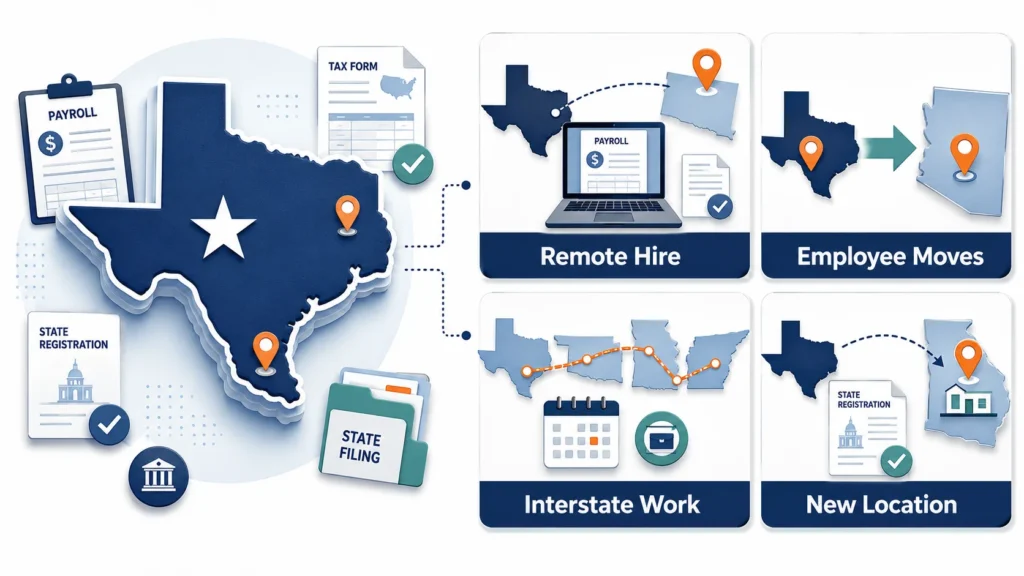
The core principle is simple. Payroll obligations follow the employee’s physical work location. A few common situations trigger them:
- You hire a remote employee who lives and works in another state.
- An existing employee moves out of Texas and keeps working for you from their new state.
- An employee regularly travels to work in another state, sometimes past that state’s day-count threshold.
- You open a location or hire a team in another state.
Even one employee working in another state may trigger withholding, unemployment, workers’ compensation, or business-registration requirements. The result depends on that state’s thresholds, its exceptions, and the employee’s work pattern. Some states offer a day-count “de minimis” safe harbor, meaning a small number of workdays are allowed before withholding applies. A federal 30-day standard has also been proposed several times, most recently the Mobile Workforce State Income Tax Simplification Act of 2025 (S.1443). As of July 2026 it has been introduced but has not become law, so each state’s own rules still apply.
State registrations and income tax withholding
The general rule is to withhold state income tax for the state where the employee performs the work, not where your company sits. To do that, you register with that state’s tax agency for a withholding account and then withhold and pay on that state’s schedule. A few nuances change the answer:
- Reciprocity agreements: a reciprocity agreement is a deal between two states to tax only their own residents. Some states let qualifying nonresident employees claim exemption from work-state withholding. The employee normally submits the required certificate. Confirm whether you must or may withhold for the employee’s residence state.
- Convenience-of-the-employer rules: some states may treat an employee’s remote workdays as taxable in the employer’s state when the person works elsewhere for personal convenience. These rules have important exceptions and change over time. Check the employer state’s current tax guidance before setting withholding.
- No-income-tax work states: if the employee works in a state without a personal income tax (including Texas), there is no state income tax to withhold there. The other obligations below still apply.
- Local taxes: some cities and counties have their own income taxes that you may also need to withhold.
New-hire reporting: you can report new employees to each applicable state under its own rules, or register as a multistate employer with the federal Office of Child Support Services and designate one state for all new-hire reports. Confirm the method and deadlines before your first report. In Texas, reporting through Texas is generally required within 20 calendar days.
Unemployment (SUTA) accounts: where you pay
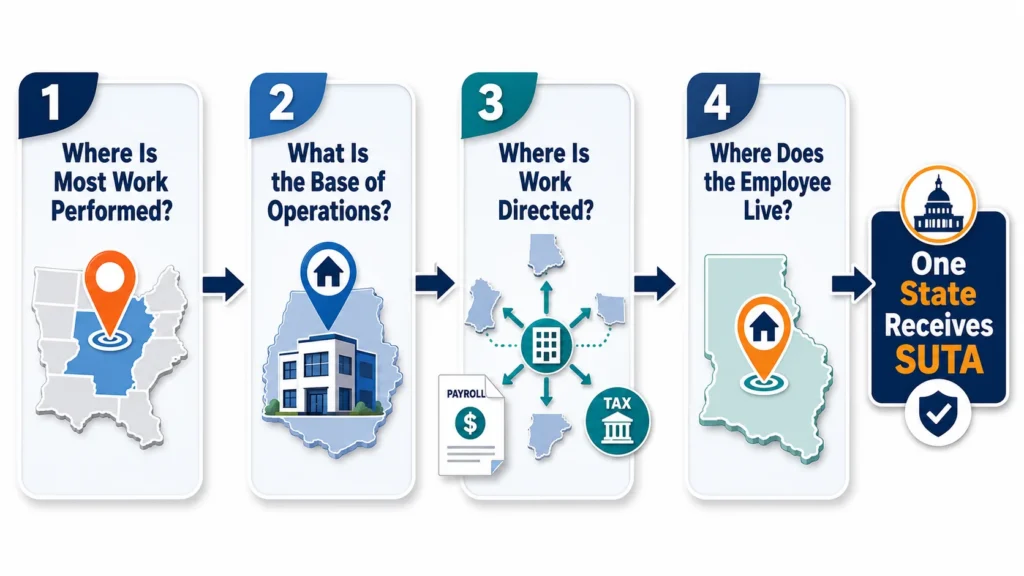
You pay state unemployment tax to only one state per employee, even if that person works in more than one. To find the right state, employers use a standard federal test called the “localization of work” provisions, which point to the single state that covers the work. You apply the four parts in order until one answers:
- Localization: the state where the employee’s work is mostly performed.
- Base of operations: if the work is not localized in one state, the state that serves as the employee’s base.
- Direction and control: if there is no clear base, the state from which the work is directed or controlled.
- Residence: if none of the above resolve it, the employee’s state of residence.
Once you determine the state, you register for a SUTA account there and pay unemployment tax at your assigned rate. For a Texas employer with a worker permanently based in another state, SUTA usually goes to that state rather than to Texas.
Nexus basics: what a remote hire can trigger
Nexus means your business has enough connection with a state for that state to require a registration or a tax filing. An employee working in another state may create physical-presence nexus, which simply means a connection created by having a person working in the state. Whether a return or registration is required depends on the state, the tax involved, and the employee’s activities. A remote hire can reach beyond payroll:
- Payroll and SUTA registration in the work state, as covered above.
- Business income or franchise tax: a franchise tax is a state’s tax on the privilege of doing business there. A remote employee may create nexus, so your company might have to register and file business-tax returns in that state.
- Sales tax: an employee’s physical presence may affect sales-tax obligations, separately from a state’s economic-nexus rules. Ask a qualified adviser to review both standards.
- Workers’ compensation: confirm whether your existing policy covers the employee in their work state, and whether that state requires a separate policy, endorsement, or registration.
- That state’s labor laws: minimum wage, overtime, pay frequency, final-pay timing, pay-stub and notice rules, and any paid-leave mandates.
Nexus rules and thresholds vary by state. This is where a remote hire can quietly expand where your business has to file. Your Texas franchise tax is a separate Texas obligation and does not go away.
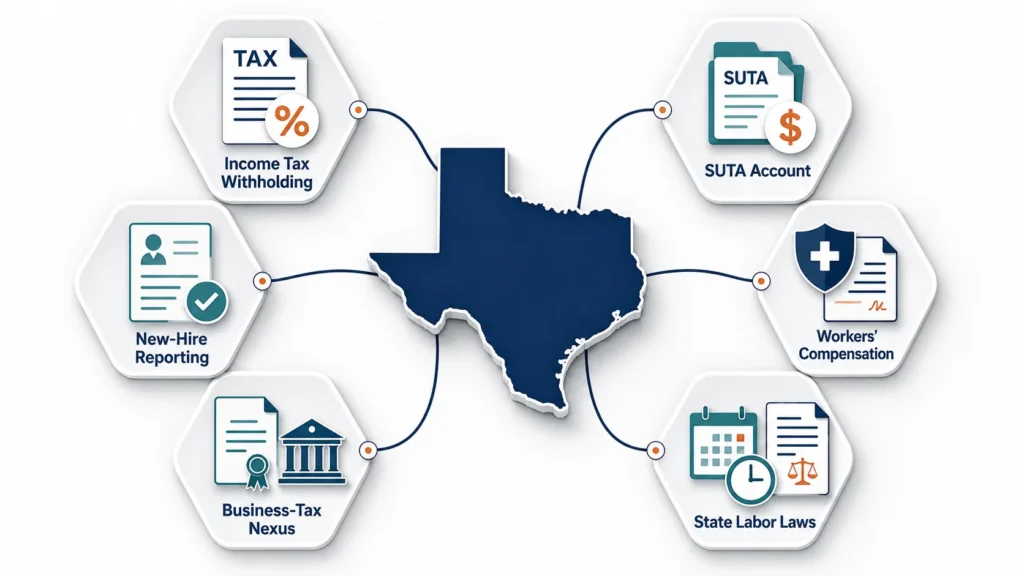
The table below shows where each obligation may apply for a Texas employer with an out-of-state employee:
| Obligation | General rule | Notes for a Texas employer |
|---|---|---|
| Income tax withholding | The employee’s work state, if it has an income tax | Texas has none; reciprocity or convenience-of-the-employer rules can change the answer |
| Unemployment tax (SUTA) | One state, set by the localization-of-work test | Usually the state where the employee mainly works |
| New-hire reporting | Report under each state’s rules, or use the federal multistate-employer option after registration | Reporting through Texas is generally within 20 calendar days |
| Workers’ compensation | The employee’s work state | Confirm the work state’s requirements and whether the existing policy provides valid coverage |
| Business-tax nexus (income / franchise / sales) | A state where the employee’s presence or activity meets that tax’s nexus standard | May require new state registrations and filings |
| Labor law (wage/hour, pay timing, leave) | The employee’s work state | Follow that state’s rules, which may be stricter than Texas |
This table is a general guide, not a determination for your situation. The correct answers depend on each state’s rules and your facts. Confirm with the state agencies or a professional.
Common multi-state payroll mistakes
These problems can also lead to filing delays, corrections, and penalties. See our guide to common payroll mistakes and IRS penalties.
- Withholding for Texas or for your headquarters instead of the employee’s work state. Because Texas has no income tax, this often means withholding nothing when another state is actually owed.
- Running the first payroll before registering in the new state. Withholding and SUTA registration can take time to set up.
- Paying SUTA to the wrong state, or missing the SUTA account in the work state entirely.
- Forgetting new-hire reporting for the employee’s work state, or not registering for the multistate option.
- Overlooking local city or county taxes in the work location.
- Assuming reciprocity or a convenience rule applies without confirming it for that state.
- Ignoring business-tax nexus (income, franchise, or sales) created by the remote employee.
- Not updating payroll when an employee moves from one state to another.
How we handle multi-state payroll at Tax by Lonestar
Multi-state payroll is mostly about setup and staying organized. Here is how we help Texas employers manage it.
- We map each employee’s work state and identify the payroll registrations to open, such as withholding, SUTA, and new-hire reporting, in that state.
- We set up and run payroll so the correct state taxes are withheld and filed, and we flag reciprocity or convenience-rule situations to look into.
- We connect payroll with your bookkeeping records and flag out-of-state activity that may need a separate nexus review.
- We keep the scope clear: within the agreed payroll scope, we can help organize payroll registrations and filings. We can also flag possible nexus, labor-law, or insurance issues for review by the appropriate tax adviser, attorney, or insurance professional. You tell us where each person works and provide complete, accurate information.
Example (illustration): a Texas company hires a remote employee who works full time from Colorado. Before the first payroll, we would review the employee’s work location, the payroll-tax and unemployment registrations needed in Colorado, the new-hire reporting method, and workers’-comp coverage, then confirm which filings are included in our service and which issues need separate tax, legal, or insurance advice. [This is a hypothetical illustration. Mohsin: replace with a real client example if one is available, or keep it clearly labeled as hypothetical.]
Book a free payroll consultation and we’ll walk through where your remote or out-of-state employees create obligations, and what to set up first.
Frequently asked questions
Do I have to withhold Texas income tax for a remote employee?
Texas has no individual state income tax, so there is nothing to withhold for Texas. Instead, you generally withhold for the state where the employee physically works, if that state has an income tax. If they work in another no-income-tax state, there is no state income tax to withhold there either, but other obligations still apply.
If I hire one remote employee in another state, do I really have to register there?
Often, but not automatically in every state. Check the withholding, unemployment, new-hire, workers’ compensation, and business-registration rules before the employee’s first payroll. The result depends on that state’s thresholds and the employee’s work pattern.
Which state gets the unemployment tax for a remote worker?
You pay SUTA to one state per employee, determined by the localization-of-work test: usually the state where the person mainly works, then base of operations, then where the work is directed, then residence. For a worker permanently based in another state, that is typically their state, not Texas.
Can a remote employee create sales or income tax nexus for my Texas business?
It may. An employee physically working in a state can create nexus there, which may require your business to register and file income, franchise, or sales tax returns in that state. Whether a filing is required depends on the state, the tax, and the employee’s activities, so it is worth reviewing each state where you have staff.
Is there a federal law that simplifies multi-state payroll?
A federal 30-day standard has been proposed several times, most recently the Mobile Workforce State Income Tax Simplification Act of 2025 (S.1443). As of July 2026 it has been introduced but has not become law. Until it does, each state’s own rules apply.
The bottom line for Texas employers
Hiring across state lines is very doable. It just adds a compliance layer that Texas’s no-income-tax simplicity does not cover. The key is to treat each employee’s work state as its own set of obligations. Register for withholding and unemployment tax there, handle new-hire reporting and workers’ comp, watch for business-tax nexus, and follow that state’s labor laws. Set it up correctly at the start, and multi-state payroll becomes routine.
Hiring remote or out-of-state and not sure where to start? Tax by Lonestar is based at 825 Watters Creek Blvd, Building M, Suite 250, Allen, TX 75013, and we serve Allen, Fairview, McKinney, Plano, and Frisco. Call +1 469-888-8492 or book a free payroll consultation, and we’ll walk through your obligations state by state.