
Switching payroll providers can save money and cut down on headaches, but the timing and the data handoff matter. Do it carelessly in the middle of the year, and you can end up with wrong W-2s, duplicate tax payments, or a compliance gap at year-end. A well-planned switch can cause little disruption for employees. This Texas guide covers when to switch, what data to move, and how to keep your year-to-date numbers and W-2s clean.Businesses that need help planning the transition can use our payroll services in Allen, TX.
Please note: this is general information, not legal or tax advice. Payroll tax figures change each year and your situation may differ. Confirm the details with your providers, the IRS, and the Texas Workforce Commission, or with a qualified professional, before you act.
One key point up front: using a payroll provider does not remove your responsibility for payroll taxes and filings. You may still owe taxes, penalties, and interest if a provider fails to deposit taxes or file returns. Check that deposits and returns were actually completed, even when a provider handles them for you.
Short answer: The cleanest time to switch is the start of a quarter, and January 1 is best of all. Switching then avoids splitting a quarter, or a tax year, across two providers. If you switch mid-year, move accurate year-to-date payroll totals to the new provider. Without them, the new system may restart annual tax limits, like Social Security’s $184,500 cap and Texas’s $9,000 unemployment base for 2026. In Texas there is no state income tax account to move, but you do need your Texas Workforce Commission unemployment account and rate.
Signs it’s time to switch
A few common reasons Texas businesses look for a new payroll provider:
- Rising prices or surprise fees that were not in the original quote.
- Slow or hard-to-reach support when you have a question or a problem.
- Tax filing or deposit errors, or notices from the IRS or TWC.
- Outgrowing the platform, for example needing multi-state payroll, tip handling, or benefits.
- Too much manual work or weak integration with your accounting software.
- Wanting a local provider who also handles your bookkeeping and taxes.
If you are weighing specific providers, our payroll comparison guide (linked below) walks through the trade-offs.
The best time to switch
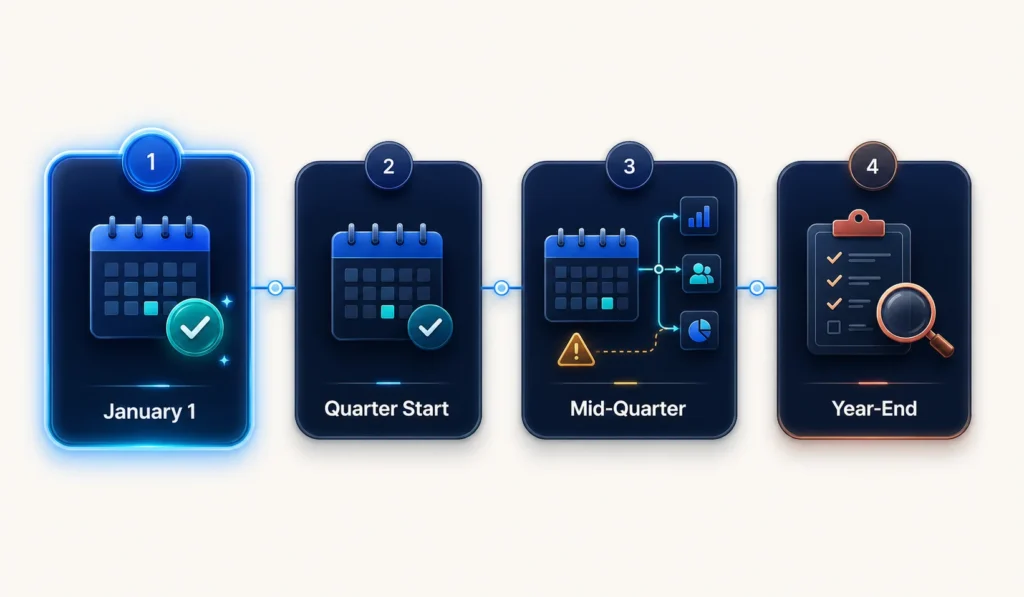
Timing is the easiest way to make a switch clean. The goal is to avoid splitting a single quarter, or a single tax year, across two providers.
| When to switch | Why |
|---|---|
| January 1 (start of the year) | Cleanest option. No year-to-date migration, and one W-2 per employee. |
| Start of a quarter (Apr 1, Jul 1, Oct 1) | Clean Form 941 handoff. You migrate year-to-date once, at a natural break. |
| Mid-quarter | Possible, but it adds reconciliation work and 941 coordination. |
| Q4, before year-end | Possible, but it needs careful year-to-date review and a clear W-2 filing plan. |
Why quarters matter: Form 941 is filed each quarter, so a quarter boundary lets the old provider file a full quarter and the new one start fresh. That keeps a single quarter from being split between two filers.
Data you must migrate

Gather this information before your first payroll on the new system. “Year-to-date” (YTD) means the running totals for the calendar year so far.
| Category | What to gather |
|---|---|
| Company | Legal name, EIN, Texas Workforce Commission unemployment account number and current SUI rate, and your deposit schedule. |
| Employees | Names, Social Security numbers, addresses, Forms W-4, pay rates, and direct deposit details. |
| Year-to-date totals (per employee) | Gross wages, federal income tax withheld, Social Security and Medicare wages and taxes, FUTA and Texas SUTA wages, pre-tax deductions, and employer contributions. |
| Tax history | Deposits made and returns filed year-to-date, including prior-quarter Form 941s and unemployment tax paid. |
| Current-quarter tax detail | Payroll registers, federal tax liability by pay date, deposit dates and amounts, EFTPS confirmations, and Schedule B data if you are a semiweekly depositor. |
| Deductions and other | Benefit deductions, garnishments, PTO balances, and any tip or reimbursement records. |
Year-to-date and W-2 continuity
This is where a mid-year switch goes right or wrong. Several payroll taxes have an annual wage base. A wage base is a cap on the wages that are taxed for the year.
- Social Security tax stops once an employee’s wages reach the wage base ($184,500 in 2026).
- FUTA (federal unemployment) applies to the first $7,000 of each employee’s wages.
- Texas SUTA (state unemployment) applies to the first $9,000 of each employee’s wages.
The new system needs each worker’s full-year totals. Without them, it may start these limits again. That can over-withhold Social Security for higher earners and over-pay FUTA and Texas unemployment tax. Loading accurate year-to-date totals prevents that.
What about W-2s? A provider change does not create a new employer. If the business keeps the same EIN, the year-end process should normally produce one Form W-2 for each employee. The new provider needs complete year-to-date data from the old system. Both providers must also confirm which one will prepare and file the full-year W-2s. Do not let both providers submit overlapping wage reports under the same EIN, because the Social Security Administration may add the wages together and inflate an employee’s earnings record.
Who files Form 941? Your business is responsible for one complete Form 941 for each quarter. A payroll provider may file it for you when properly authorized, using your EIN, but you remain responsible. If you switch mid-quarter, choose one provider to combine the full quarter’s payroll data and file the single return. Confirm that the other provider will not file a second return for the same quarter. At year-end, reconcile total wages and taxes to your W-2s and Form W-3.
The Texas piece: because Texas has no state income tax, there is no state withholding account to move. You do authorize the new provider in two places: federally, a reporting agent uses IRS Form 8655; and with Texas, you file TWC Form C-42 (and Form C-43 to revoke the old provider’s access). Give the new provider your current SUI rate, and keep new-hire reporting going. Authorizing a provider does not transfer your responsibility for the account.Our Texas Workforce Commission reporting guide explains quarterly wage reports, unemployment-tax payments, and common filing mistakes.
Mid-year switch checklist
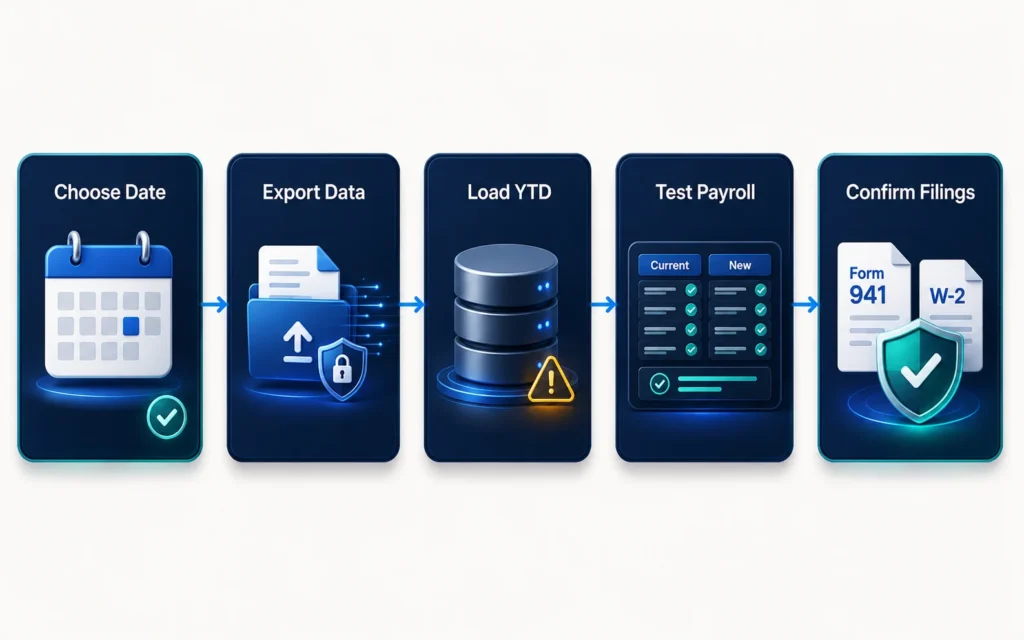
A clean-switch checklist for Texas employers:
Pick a switch date, ideally the start of a quarter (January 1 is best).
Choose the new provider and confirm it handles your needs (multi-state, tips, benefits).
Gather company data: EIN, TWC unemployment account and SUI rate, deposit schedule.
Export employee data and Forms W-4.
Export year-to-date totals per employee and prior-quarter Form 941s.
Load and verify year-to-date data in the new system before the first live payroll.
Run a test or parallel payroll and compare it to the old system.
Confirm which provider will combine the full quarter’s data and file the single Form 941 for that quarter (the other must not file a second return).
Complete the federal reporting-agent authorization (IRS Form 8655) and confirm its starting period.
Authorize the new provider with TWC (Form C-42) and remove the old provider’s access when appropriate (Form C-43).
Transfer employee and payroll files through a secure portal or encrypted method. Do not email unprotected files with Social Security or bank information. Confirm when the old provider removes access and how long records stay available.
Check EFTPS and IRS records to confirm required federal deposits were made.
Keep the old account open until final filings and W-2s are confirmed.
Reconcile totals at year-end against your W-2s and Form W-3.
How we manage the move
A payroll switch is mostly about careful setup and a clean handoff. That is where we help Texas businesses.
- We handle the setup and data migration and verify it before the first live payroll.
- We load and check year-to-date totals so wage bases do not restart, which reduces the risk of W-2 errors.
- We coordinate the 941 and W-2 handoff so your filings stay continuous, and we keep the old account open until final filings are confirmed.
- We keep the scope clear: within the agreed scope, we manage the setup and filings, and we flag anything that needs another professional. You provide complete, accurate data, and you remain responsible for it.
Book a free payroll consultation and we’ll map out the cleanest switch date for your business and what to gather.
Frequently asked questions
When is the best time to switch payroll providers?
The start of a quarter is cleanest, and January 1 is best of all. A quarter boundary lets the old provider file a full Form 941 and the new one start fresh, and a start-of-year switch avoids year-to-date migration and gives you one W-2 per employee.
Will my employees get two W-2s if I switch mid-year?
Normally no. A provider change does not create a new employer, so when the employer and EIN stay the same, each employee should receive one full-year W-2. Make sure the new provider receives all earlier payroll data, and confirm that only one provider will submit the year-end forms. Avoid having both providers file wage reports under the same EIN.
What happens if year-to-date data is not transferred?
The new system can restart each employee’s totals at zero. That can over-withhold Social Security for higher earners (the tax stops at $184,500 in 2026) and over-pay FUTA and Texas unemployment tax, which are capped at $7,000 and $9,000 of wages. It can also lead to W-2 errors.
Do I need to move a state tax account when switching in Texas?
Texas has no state income tax, so there is no state withholding account to move. You do need to authorize the new provider on your Texas Workforce Commission unemployment account and give them your current SUI rate.
Can I switch payroll mid-quarter?
Yes, but it adds work. You will need to migrate year-to-date data and coordinate which provider files that quarter’s 941. Switching at the start of a quarter avoids most of that.
The bottom line
A payroll switch is very manageable when you plan the timing and move the data carefully. Aim for the start of a quarter, migrate accurate year-to-date totals, coordinate the 941 and W-2 handoff, and reconcile at year-end. Get those right, and the change is smooth for your team and clean at tax time.
Thinking about a switch? Tax by Lonestar is based at 825 Watters Creek Blvd, Building M, Suite 250, Allen, TX 75013, and serves Allen, Fairview, McKinney, Plano, and Frisco. Call +1 469-888-8492 or book a free payroll consultation and we’ll plan a clean move.