
Texas Workforce Commission reporting is one of those quarterly tasks that feels simple until the deadline is three days out and you’re not sure whether you file the wage detail, the tax payment, or both. If you’re a registered Texas employer, you generally file a wage report every required quarter — including quarters where you paid no wages at all. This guide walks through exactly what to file, who has to file it, when it’s due in 2026, and common filing mistakes that can lead to penalties.
It’s written for small-business owners across North Texas who run their own payroll or want to understand what their bookkeeper handles on their behalf. Plain language, real deadlines, and the details that catch people out.
One important 2026 note up front: TWC is replacing its online tax systems with a new platform, the Texas Unemployment System (TxUS). It’s not fully live yet, and TWC hasn’t announced an official launch date — more on what that means for filing below.
What Texas Workforce Commission reporting is
Every quarter, employers in Texas report the wages they paid to the Texas Workforce Commission (TWC) and pay unemployment insurance (UI) tax on a portion of those wages. That’s the job in one sentence — but there are two moving parts inside it.
The first is the wage report: the per-employee detail (Social Security number, name, and gross wages paid) plus summary totals for the quarter. The second is the tax payment: the UI tax you owe based on those wages and your assigned rate. Both are due together, and both go to the TWC — not the IRS. This is a state filing, separate from federal payroll taxes like Form 941 or FUTA.For the full federal and state picture, see our complete Texas payroll guide.
The tax funds the state’s Unemployment Compensation Fund, which pays benefits to workers who lose their jobs through no fault of their own. Worth knowing: UI tax is paid entirely by the employer. It is never deducted from employee paychecks. If anyone has told you otherwise, they’re thinking of a different tax.
The legal basis is the Texas Unemployment Compensation Act (TUCA). On paper, the filing is split across two forms: Form C-3 (the Employer’s Quarterly Report, showing total and taxable wages) and Form C-4 (the wage list of employee names, SSNs, and amounts). Most employers never touch the paper versions, because Texas requires electronic filing — covered below.
Who must file with the TWC
Not every business owner has to file. You become a “liable employer” — TWC’s term for someone responsible for UI tax — once you cross certain thresholds. The trigger depends on the type of employment.
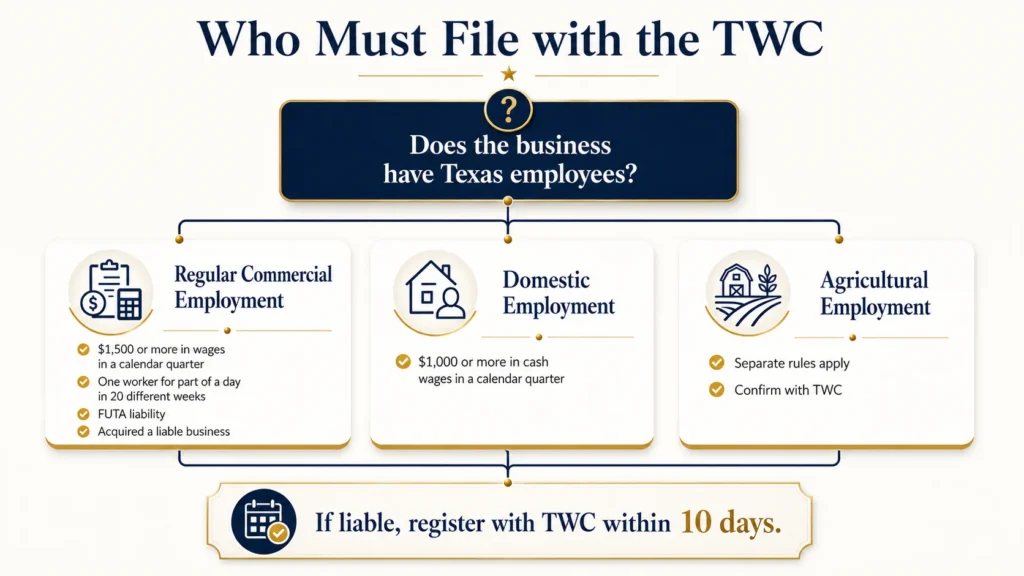
Regular (commercial) employment
You’re liable, and must register, if any one of these is true:
- You paid $1,500 or more in total gross wages in any calendar quarter in the current or preceding calendar year.
- You employed at least one person for part of a day in 20 or more different weeks in the current or preceding calendar year (the weeks don’t have to be consecutive).
- You already pay federal unemployment tax (FUTA) in Texas or another state.Businesses with employees working across state lines may also face registration and payroll obligations outside Texas.
- You acquired all or part of a business that was already liable for Texas UI tax.
- You’re a qualifying 501(c)(3) nonprofit that employed at least four people for part of a day in 20 or more different weeks in the current or preceding calendar year.
The $1,500 threshold catches most small employers quickly. A single part-time hire at $12/hour working 25 hours a week crosses it inside the first quarter. You can see the full definitions on TWC’s types of employment page.
Domestic and agricultural employment
The rules differ for household and farm labor. For domestic employment — nannies, housekeepers, caretakers, and similar work in a private home — liability begins when you pay $1,000 or more in cash wages in a calendar quarter in the current or preceding calendar year. Agricultural employment has its own separate thresholds. If you employ farm or ranch labor, confirm your specific trigger with the TWC rather than assuming the commercial rule applies.
One useful exception for households: certain domestic-only employers can elect to report and pay annually instead of quarterly, with the annual report due the following January. If that’s you, ask TWC about the annual election rather than filing four times a year.
A note on reimbursing employers
Most employers pay UI tax quarterly. Some — notably government entities and certain 501(c)(3) nonprofits — can instead elect to be reimbursing employers, repaying TWC dollar-for-dollar for benefits actually paid to their former workers rather than paying the quarterly tax. It’s a different model with different tradeoffs, and it’s worth a conversation with a professional before electing it.
When you need to register
Once you become liable, you have 10 days to register for a TWC tax account. You can do this online through TWC’s Unemployment Tax Registration, and you’ll get your tax account number right away, with an Employer Liability Notice following in the mail.
Don’t confuse registration with new-hire reporting — they’re two separate obligations. New and rehired workers must be reported to the Employer New Hire Reporting Operations Center within 20 days of their effective hire date. That’s a different filing, administered through the Texas Attorney General’s office, and skipping it is a common oversight for first-time employers.
Quarterly wage reports: what actually goes in them
Once you’re registered, the quarterly wage report is your recurring task. Here’s what it contains and the rules that trip people up.
For each employee, you report their Social Security number, name, and gross wages paid during the quarter. Report workers covered by Texas unemployment tax rules. Don’t report a worker who is properly classified as an independent contractor — but note that issuing a Form 1099 doesn’t, by itself, make someone one. TWC looks at the actual working relationship and your degree of control, not just the tax form used.
Alongside the per-employee detail, the report also asks for summary totals and three monthly employee counts: for each month in the quarter, the number of covered employees who worked or received pay during the payroll period that included the 12th day of that month. So it’s more than a single wage figure per person.
One detail matters more than people expect: you report wages when they’re paid, not when they’re earned. A paycheck for hours worked in late March but dated April 2 belongs to the second quarter, not the first.
The $9,000 taxable wage base
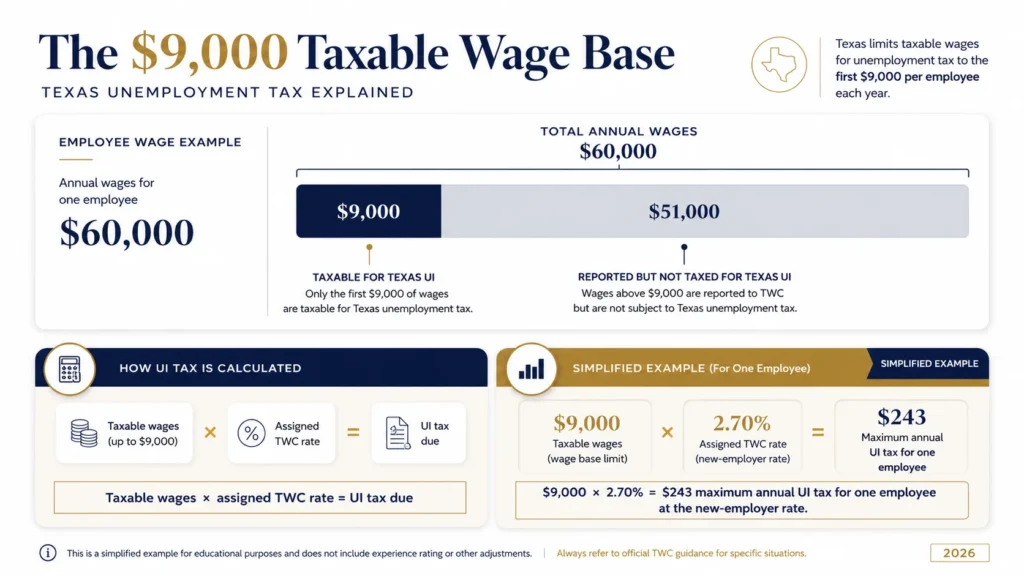
You report every dollar of gross wages, but you only pay tax on the first $9,000 you pay each employee per calendar year. That figure is the “taxable wage base,” and it resets every January.
Say an employee earns $60,000 a year. You pay UI tax on only the first $9,000 of that — a threshold you’ll usually cross in the first quarter or two. After that, none of their remaining wages are taxable for the year, even though you keep reporting their gross pay each quarter. Your actual tax is that taxable amount multiplied by your assigned rate. Full detail is on TWC’s reporting and determining taxable wages page.
Your tax rate, and why new employers start at a fixed rate
New employers don’t get an experience-based rate right away — there’s no track record yet to base one on. For 2026, the entry-level rate is 2.70% for every industry group, with no exceptions. You stay on that predetermined rate until you’ve completed enough chargeable quarters for TWC to assign an experience rate, which it calculates each October to take effect the following year.
Don’t read “new-employer rate” as “the highest rate,” though. For 2026, experience-rated employers pay anywhere from 0.32% to 6.32%, depending on their claims history. A new employer at 2.70% sits in the middle — below a business with heavy unemployment chargebacks, above one with a clean record. Rate notices usually arrive in December, so check yours before the first filing of the new year; your rate can change. See your 2026 tax rates for the component breakdown.
No wages this quarter? You still file
This is a frequently overlooked requirement. If you’re a registered, liable employer and you paid no wages in a quarter, you still have to file — a “no wages” or zero report. Having no payroll that quarter doesn’t pause your obligation; it just generates a late-filing penalty. File the zero report every quarter until you formally close your account with TWC.
Deadlines and how to file
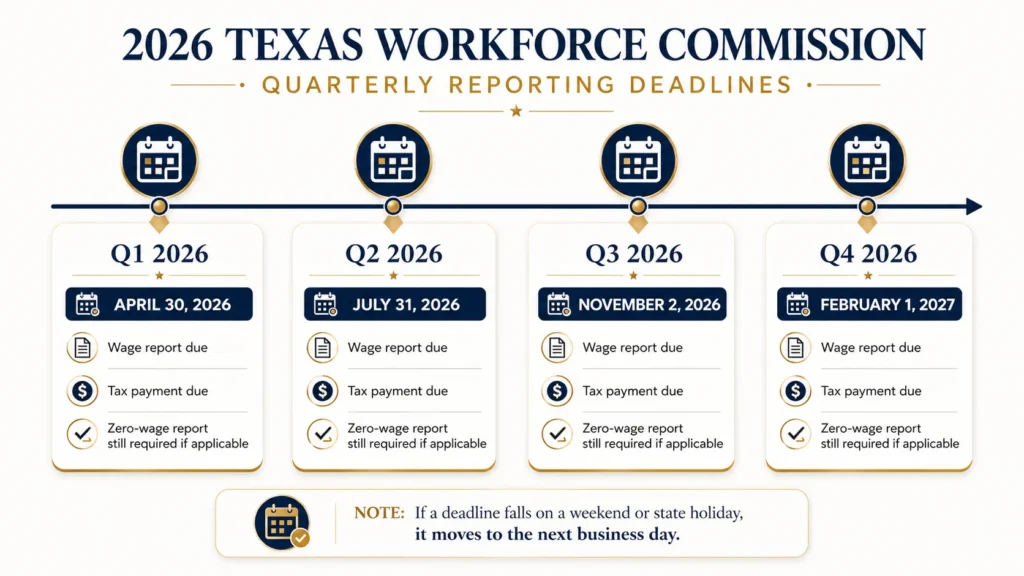
Texas keeps the schedule simple. For most taxed employers, the wage report and tax payment are due by the last day of the month following the end of each calendar quarter. If that day falls on a weekend or a legal holiday when TWC offices are closed, the deadline moves to the next business day — which matters in 2026.
The 2026 quarterly deadlines
| Quarter | Period covered | Standard due date | Actual 2026 deadline |
|---|---|---|---|
| Q1 2026 | January – March | April 30 | April 30, 2026 (Thursday) |
| Q2 2026 | April – June | July 31 | July 31, 2026 (Friday) |
| Q3 2026 | July – September | October 31 | November 2, 2026 (Monday)* |
| Q4 2026 | October – December | January 31 | February 1, 2027 (Monday)* |
*October 31, 2026 falls on a Saturday and January 31, 2027 on a Sunday, so those two deadlines roll to the following Monday. Always confirm against TWC’s tax report and payment due dates page. Miss a deadline without that weekend grace and you’ll owe penalty and interest.
Reimbursing employer exception: The deadlines above cover regular taxed employers. Reimbursing employers still file their quarterly wage report by the same report deadline, but instead of paying tax with it, they repay TWC for benefits charged to them — billed separately, with payment due by the last day of the following month.
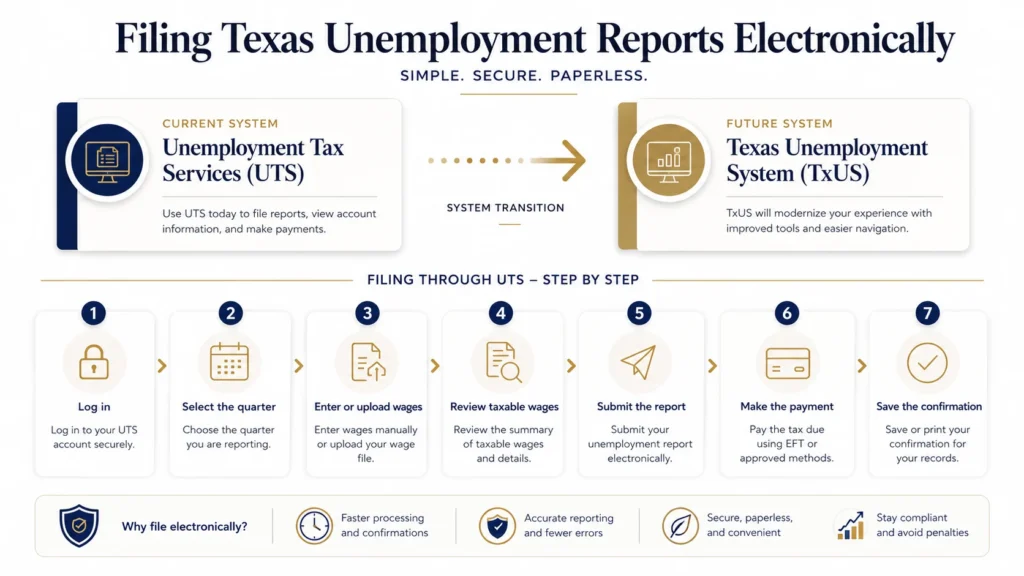
Heads up — system change in 2026: TWC is rolling out a new platform, the Texas Unemployment System (TxUS), to replace Unemployment Tax Services (UTS), Unemployment Tax Registration (UTR), QuickFile, and other legacy tools. As of this article’s July 2026 review, TWC had not announced an official full-launch date, UTS is still the active system, and the steps below still apply. When TxUS does launch, expect to create a brand-new user ID and password (your old credentials won’t carry over), though your TWC account number and filing history will. Confirm the current system on TWC’s TxUS announcement page before you file.
Your electronic filing options
Texas requires almost all employers to file wage reports and pay taxes electronically (TWC Rules 815.107 and 815.109). Paper is allowed only if you’ve been granted an electronic hardship waiver. TWC offers two free electronic filing methods:
- Unemployment Tax Services (UTS) — TWC’s free online portal, built for employers with 1,000 or fewer employees. It’s the default for most small businesses and lets you upload a wage file (Excel or CSV), start from your last report, key in wages manually, or file a no-wages report.
- QuickFile — a free downloadable program aimed at bookkeepers, accountants, and payroll agents who file for multiple clients at once.
Beyond those two free methods, some commercial payroll software (such as Intuit’s EasyACCT) can also upload Texas wage reports for employers who already use it — but that’s a paid product, not one of TWC’s free options. Note that when TxUS goes live, TWC has said QuickFile and EasyACCT uploads will no longer be supported; TxUS will handle bulk uploads directly instead. You can review current choices on TWC’s filing options page.
How to file through UTS, step by step
For a small business filing its own report, UTS is the current path. Here’s the flow, start to finish:
- Log in to Unemployment Tax Services at the TWC website using your TWC account credentials. If it’s your first time, you’ll create a UTS user ID linked to your tax account number.
- Open the Report Filing tab and select the quarter you’re filing for. The current quarter becomes available on the first day of the filing month.
- Choose your entry method — upload a wage file, copy your previous report forward and edit it, or key wages in by hand. For a handful of employees, manual entry is quickest.
- Enter each employee’s detail — Social Security number, name, and gross wages paid this quarter. Check that SSNs and names match your payroll records exactly; incorrect or invalid SSNs can cause validation errors or report rejection.
- Review the summary — UTS calculates total gross wages, taxable wages (capped at $9,000 per employee, year-to-date), and the tax due at your assigned rate. Confirm the math against your payroll records before you submit.
- Submit the report and then make the payment — you can pay by electronic funds transfer (ACH debit) or another authorized electronic method. Filing the report and paying the tax are two separate actions; don’t stop after the first.
- Save your confirmation. Keep the confirmation number and a copy of the filed report. Texas requires employers to retain payroll records for four years.
One habit worth adopting: don’t file on the last day. TWC itself warns that network problems or processing delays near the deadline can hold up your submission and result in late penalties — and “the system was slow” won’t waive them. File a few days early.
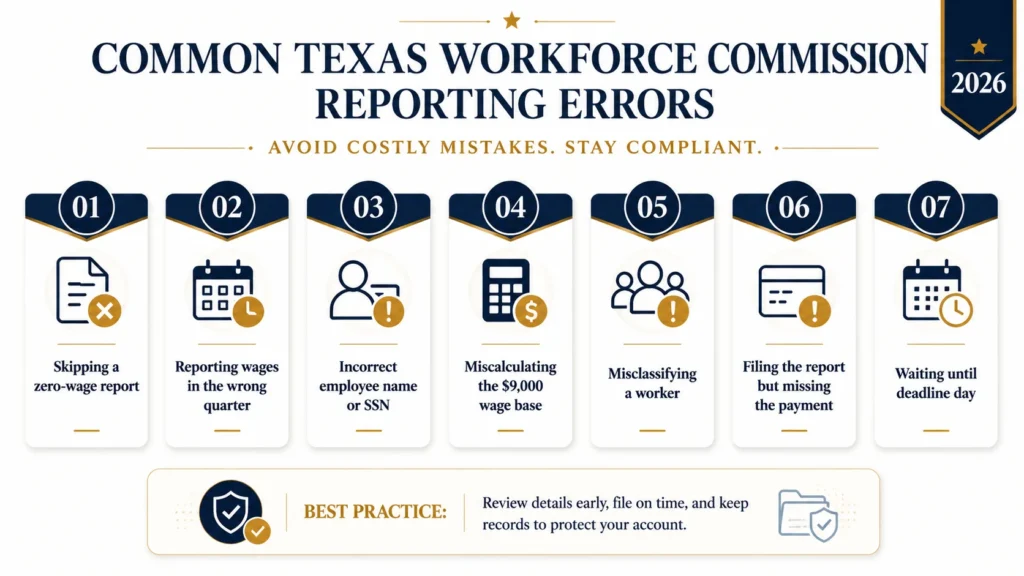
Common Texas Workforce Commission reporting errors
Common avoidable reporting errors include:
- Skipping the zero report. No payroll that quarter still means a filing is due. Silence reads as non-compliance, not “nothing to report.”
- Reporting wages when earned instead of when paid. This shifts wages into the wrong quarter and throws off both the report and the tax.
- Incorrect employee names or Social Security numbers. A typing error or an incorrect legal name can cause validation problems — the name and SSN together must match official identity records. Pull details straight from the W-4 or payroll system.
- Miscalculating the $9,000 base. Some employers pay tax on full gross wages instead of capping at $9,000 per employee per year, and overpay. Others forget the base resets each January.
- Misclassifying workers. Don’t leave a worker off the report just because you issued a Form 1099. TWC looks at the actual working relationship, not only the tax form used.
- Missing the 10-day registration or 20-day new-hire deadline. First-time employers can miss either one — both are easy to overlook.
- Filing the report but forgetting the payment. They’re separate steps. A filed report with no payment still accrues interest.
- Waiting until deadline day. Technical hiccups become your problem, and the penalty is real.Similar deposit and filing mistakes can also create federal penalties. Our guide to payroll mistakes that trigger IRS penalties explains the most common problems.
If you catch an error after filing, you don’t have to live with it — TWC has an adjustment process for correcting a wage report. Fix it promptly rather than letting it compound across quarters.
Frequently asked questions
Do I have to file if I only have one part-time employee?
Likely yes. If you pay $1,500 or more in gross wages in any calendar quarter, you’re liable regardless of how many people that covers. One part-time hire can cross the threshold quickly.
What’s the difference between Form C-3 and Form C-4?
Form C-3 is the quarterly report summarizing your total and taxable wages; Form C-4 is the per-employee wage list (name, SSN, and amount). Filing electronically through UTS combines both into one submission.
Is TWC unemployment tax the same as federal FUTA?
No. TWC reporting is state UI tax, filed quarterly with Texas. FUTA is federal, reported annually to the IRS on Form 940. You may owe both, and they’re calculated separately.
What happens if I file late?
TWC may assess a late-report penalty, late-payment interest, or both, depending on the circumstances. The exact amount is calculated using TWC’s computation worksheet inside the filing system, not a single flat figure.
Can my bookkeeper file this for me?
Yes. With third-party authorization, a bookkeeper or payroll provider can file wage reports and prepare payments on your behalf. Our payroll services include Texas Workforce Commission reporting for eligible clients. Before choosing help, review our ADP vs Gusto vs local payroll comparison.
We file it for you
Quarterly TWC reporting isn’t hard, but it is constant — four deadlines a year, every year, with penalties for the ones you miss. And once TWC’s new TxUS system launches, there’ll be a new login and interface to learn on top of it. For a lot of North Texas business owners, the smarter move is to hand it off and get the time back.
At Tax by Lonestar, we handle Texas Workforce Commission reporting as part of our payroll services — wage reports filed, taxable wages calculated correctly, payments made on time, and confirmations kept on file. You stay compliant without watching the calendar. If you’re managing your own books and want the full picture, our complete Texas payroll guide ties this together with federal obligations like FUTA, Form 940, and quarterly Form 941.
[LOCAL PROOF POINT — insert a genuine, verifiable example here (e.g., number of North Texas clients whose quarterly filings you manage, or a real documented outcome). Do not publish a fabricated figure.]
Book a free payroll consultation and we’ll review your current setup, catch anything that could cost you a penalty, and take the quarterly filing off your plate.
Written by the payroll team at Tax by Lonestar, a North Texas tax and bookkeeping firm. This article is general information, not tax advice; your situation may vary. For guidance specific to your business, talk to a qualified professional. Information reflects TWC guidance current as of July 2026.